
Planning & Zoning
Your Planning Process, Built Into the System
Configurable review workflows, departmental routing, invoice-per-submittal, comment management, GIS integration, and a modern public portal, all in one platform built around how your city actually works.
- Configurable to your city: Review stages, department assignments, deadlines, fee schedules, invoice triggers, and notification content, all configurable per application type.
- Configurable to your city: Review stages, department assignments, deadlines, fee schedules, invoice triggers, and notification content, all configurable per application type.
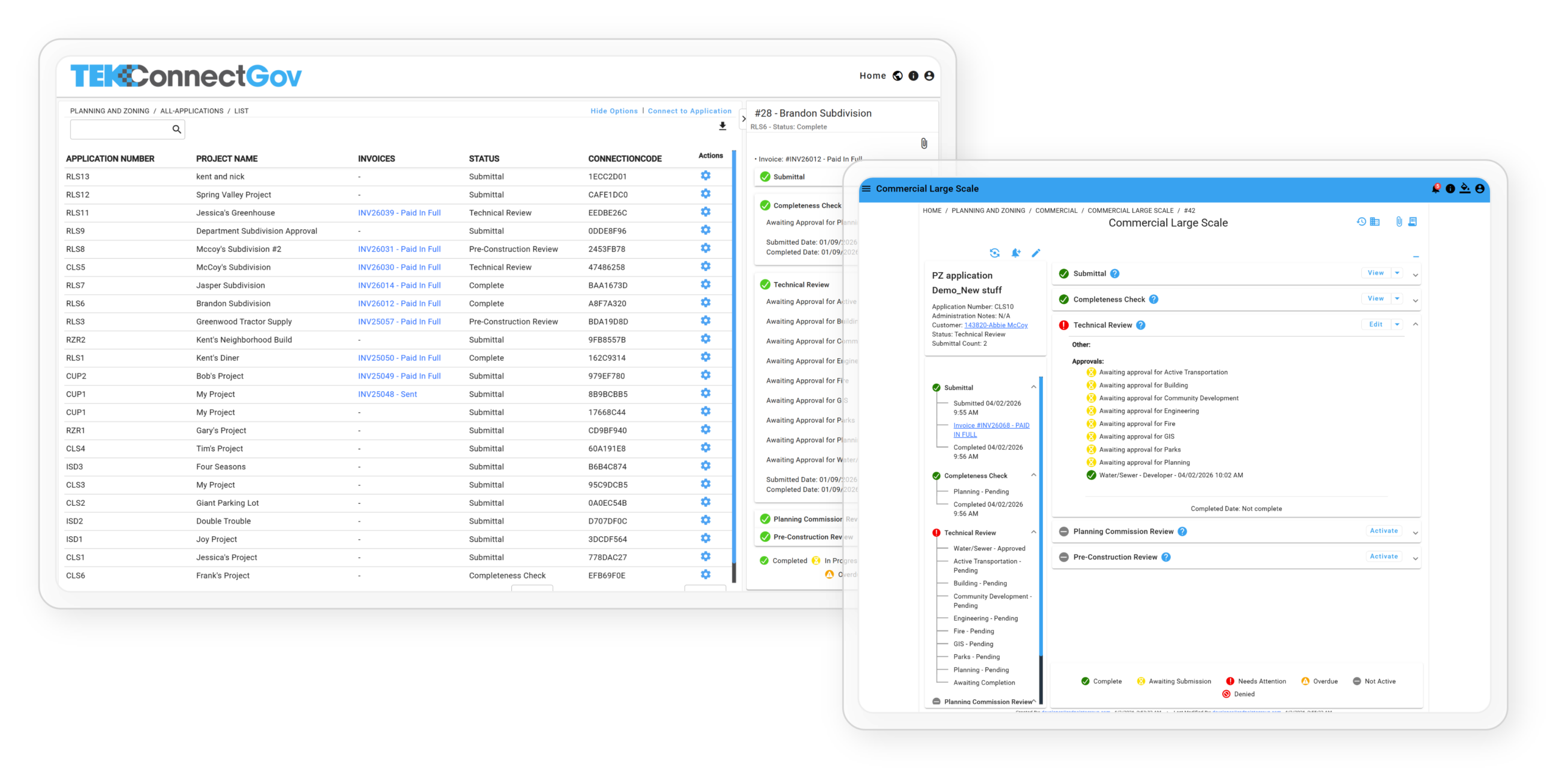
How A Permit Works
From Application to Certificate of Occupancy
Every step happens online. No office visits for applicants.
No manual tracking for staff.
01
Application Submitted Online
Applicant submits through the public portal, uploads documents, pays the filing fee online at point of submission.
02
Routing to Review Departments
System automatically routes to the correct departments based on application type. Planning, Engineering, Fire Marshal, Public Works, Building, each notified when it is their turn.
03
Departmental Review & Comments
Each department reviews, adds comments and correction requests directly in the system. All comments tracked, timestamped, and visible to the applicant.
04
Applicant Responds to Comments
Applicant receives notification, views all comments in one place, uploads revisions, and resubmits, eliminating back-and-forth email chains.
05
Invoice Created per Submittal
If your city invoices based on submittal count, the system creates and sends the invoice automatically. Payment collected online via Stripe.
06
Meeting Scheduling
Applications scheduled for TRC or Planning Commission hearings in-system. Applicants and relevant parties autonotified with hearing dates.
07
Final Approval & Notification
All departments approved → final approval → applicant receives automated confirmation → approved document available in portal.
- Your city defines the review stages, which departments review, in what order, what the deadlines are. The system routes automatically based on your configuration. Unlimited review step configurations.
- Your city defines the review stages, which departments review, in what order, what the deadlines are. The system routes automatically based on your configuration. Unlimited review step configurations.
Key Features
A Complete Online Solution for Planning, Zoning & Development Services
Eliminate paper forms, double entry, manual spreadsheets, and excessive emails/phone calls with a single secure platform that streamlines large-scale developments, rezoning, plats, sign permits, conditional uses, and more.

For City Staff & Review Departments
- Automatic routing and department/staff workflows ensure each application moves through the correct reviewers (Planning, Engineering, Fire Marshal, Public Works, Building, etc.)
- Full submittal history (1st Submittal, 2nd Submittal, etc.) with tracked changes and comments
- Set review deadlines with automated reminders to keep projects moving
- Built-in GIS integration lets staff and applicants verify zoning, setbacks, flood plains, utility easements, and other map layers in seconds
- Collect digital “Authorization to Apply” signatures from required departments
- Schedule applications for Technical Review Committee and Planning Commission meetings
- Custom email templates and complete audit trail
- Powerful reporting: average review time, approvals by type, upcoming deadlines, and more
Examples of Applications easily Supported
- Large-Scale Residential & Commercial Developments
- Preliminary & Final Plats
- Incidental/Minor Subdivisions & Lot Splits
- Rezone Requests
- Conditional Use Permits
- Home Occupation Permits
- Permanent & Temporary Sign Permits
- Common Signage Plans

For Citizens, Developers & Applicants
- Submit any planning or zoning application 24/7 through an easy to use public portal.
- Pay all filing fees online at point of submittal to speed up the review process.
- Upload plans, surveys, site drawings, and supporting documents in one secure location
- Track and manage projects and applications in real time on a personal dashboard
- Receive automated email notifications every step of the way (submitted, under review, corrections needed, scheduled for hearing, approved, etc.)
- View reviewer comments, upload revisions, and resubmit instantly
Common Questions
Planning & Zoning - FAQ
Can we configure our own approval steps and review departments?
Yes, and this is one of the areas where the system really stands out. Your city sets the review stages for each application type: which departments are involved, what order they review in, what the deadlines are, and what triggers the next step. Routing happens automatically based on however you have it configured, and you can set up as many different review workflows as you need for different application types.
Can we invoice applicants per submittal or per review round?
Yes. You can set up invoicing based on submittal count, submittal type, or other triggers you define. Invoices generate automatically and go out to the applicant through the portal, and payment is collected online through our built-in Stripe integration.
How does the comment and revision process work?
Reviewers leave comments directly in the system, attached to the specific submittal or document they are referencing. The applicant gets an automated notification that comments are ready, logs into their portal, and sees everything in one place. From there they can upload revisions and resubmit without any back-and-forth email or risk of losing document versions.
Can we track Planning Commission and Pre-Construction meetings through the system?
Yes. Planning commission and pre-construction items can be built into the application process. Meeting approvals, minutes, and notes all get added directly to the application record so everything stays in one place.
Does the system include GIS integration for zoning verification?
Yes. The built-in GIS lets staff and applicants check zoning classifications, setbacks, flood zones, utility easements, and overlay districts before an application is even submitted. Catching those details upfront cuts down on errors and incomplete submittals that tend to slow the whole review process down.
Modernize Your Planning & Zoning Process
Schedule a free live demo and see how quickly your city can move from paper to portal.