
Code Enforcement
Automate Code Enforcement from Violation to Resolution
Ordinance-driven follow-up scheduling, professional notice generation, full audit trail, municipal invoicing, extension tracking, and mobile field access: all in one configurable system.
- Configurable to your city: Violation types, correction periods, fee schedules, notice templates, and escalation rules — all adapt to your specific ordinances. No custom development needed.
- Configurable to your city: Violation types, correction periods, fee schedules, notice templates, and escalation rules — all adapt to your specific ordinances. No custom development needed.
Why It Matters
Complete Case Tracking Start to Finish. Nothing Falls Through the Cracks.
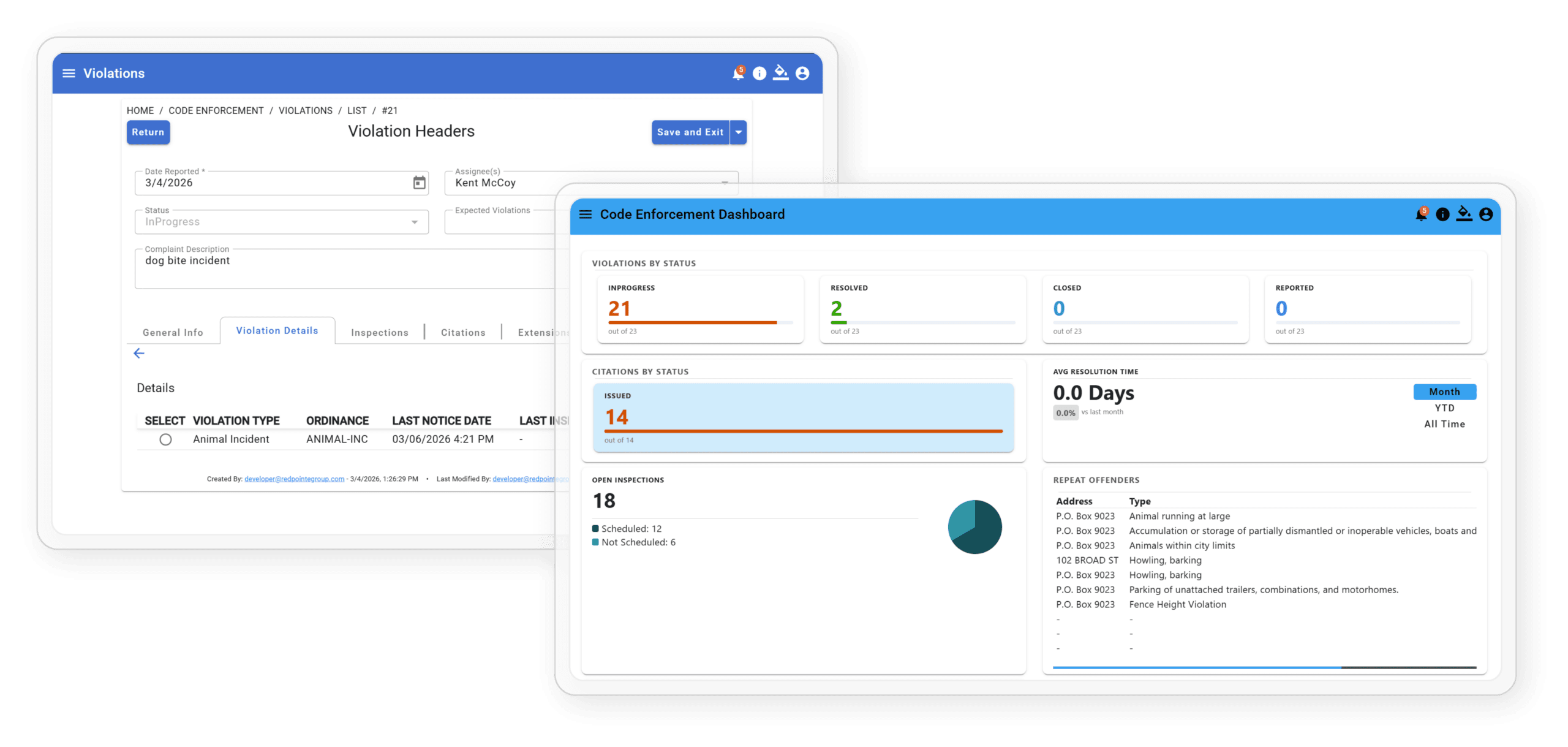
Code enforcement works when cases are documented thoroughly, followed up consistently, and visible to everyone who needs to see them. TEKConnectGov gives officers and administrators a single system that tracks every reported violation from initial complaint through follow-up inspections, any required remediation work, extension requests, and final resolution. That resolution may be a closed case or an issued citation.
How it works
From Complaint to Compliance, Automatically
The default workflow below works for most cities on day one. Every step is
configurable to your specific ordinances.
01
Violation Logged
Staff or officer creates a violation record by address, including photos, violation type, and ordinance section. The system creates the case and timestamps the date automatically.
02
Ordinance-Driven Scheduling
Based on the “days to correct” defined in your ordinances, the system automatically calculates and schedules the follow-up inspection. No manual calendar work required.
03
Officer Assigned
Case is assigned to the appropriate code enforcement officer. Officers see their full case queue from any device in the field, whether that’s a phone, tablet, or desktop.
04
Violation Notice Sent & Logged
The officer prints a professional violation notice directly from the system using the built-in template creator. Each notice is auto-populated with the property address, violation details, applicable ordinance, and the exact number of days to correct, clearly stated. Notices are hand delivered or sent by certified mail, and every notice issued is logged to the case record automatically.
05
Follow-up inspection
At the scheduled date, the officer visits the property to verify whether the violation has been corrected. The inspection result is recorded in the field on any device and logged to the case immediately.
06
Extend correction period
If additional time is warranted, the officer or supervisor can extend the correction deadline directly in the system. Every extension is logged with a reason and new date, keeping the audit trail complete.
07
Municipal invoice created (if applicable)
When the city performs remediation work on behalf of the property owner, such as mowing, debris removal, or property cleanup, an invoice is created and sent directly from the case record. Every billable action is captured and tied to the violation history.
08
Resolved/Closed or Citation Issued
Every case reaches one of two outcomes: the violation is resolved and the case is closed, or the owner remains non-compliant and a citation is issued with a complete legal-ready record.
- Configurable to your city: Correction periods, notice templates, fee schedules, extension rules, and escalation triggers are all set by your city administrator.
- Configurable to your city: Correction periods, notice templates, fee schedules, extension rules, and escalation triggers are all set by your city administrator.
Key Features
Everything Your Officers Need
Confirmed Reported Violations
Document violations with photos, assign inspectors, send notices, and schedule follow-up inspections, all from one case record.

Track Citations
Attach citations to violation records. Every code enforcement case builds a complete history, ready for legal proceedings at any time.

GIS Violation Mapping
View all active violations on a map by address. Overlay your city’s own GIS layers and parcel data for instant field context.
Built for the Field — Any Device
TEKConnectGov is a Progressive Web App that runs in any mobile browser with no download required. Officers use the full system from whatever phone or tablet they carry.

Automated Re-Inspection Invoicing
When re-inspections are triggered, the system creates and sends the fee invoice automatically. Every re-inspection fee captured. Nothing missed.
Email Notifications
Automated notifications keep every party informed at every stage, from violation issued and inspection scheduled to extension granted and citation issued, with each one timestamped and logged.
Common Questions
Code Enforcement — FAQ
What is code enforcement software?
Code enforcement software helps municipalities manage code violations from start to finish. Instead of relying on paper forms and manual follow-up, your team gets a central system to document complaints, schedule inspections, issue citations, and track resolution all in one place.
How does TEKConnectGov's code enforcement software work?
When a violation is reported, the system documents it, assigns a city inspector, and schedules a follow-up inspection automatically. Citations attach directly to the case so you always have a complete record.
How does the violation notice process work?
Officers print violation notices directly from the system using a built-in template creator. Each notice is auto-populated with the property address, violation type, ordinance section, and days to correct, with no manual drafting required. Notices are typically hand delivered or sent by certified mail, and every notice issued is automatically logged to the case record with a date stamp.
Is TEKConnectGov built for small and mid-sized municipalities?
Yes. TEKConnectGov is built for local governments that need a straightforward solution without a lot of complexity. Whether you manage a small city or a growing municipality, the software is designed to fit your team and your budget.
What types of code violations can the software manage?
TEKConnectGov supports a wide range of violations including zoning issues, property maintenance complaints, nuisance reports, and safety hazards. Inspectors can document violations, attach photos, and update cases from their phone or tablet while in the field.
Can inspectors use the software in the field?
Yes. Inspectors can submit reports, attach photos, and update case status directly from a mobile device on site. No need to return to the office to enter paperwork.
How is TEKConnectGov different from other code enforcement software?
TEKConnectGov brings violation tracking, citation management, GIS mapping, and automated notifications together in one platform built for local governments. It is easy to learn, backed by solid customer support, and designed to help your team get more done without adding complexity.
Can we invoice property owners when the city performs remediation work?
Yes. When city staff performs work on behalf of an owner, such as mowing, debris removal, property cleanup, or similar remediation, an invoice is created and sent directly from the case record. The invoice is tied to the violation, keeping the full paper trail in one place.
How do follow-up inspections work? Are they separate from building permit inspections?
Yes, completely separate. Code enforcement follow-up inspections are tied to an open violation case and exist solely to verify whether a property owner has corrected the cited issue. They are scheduled automatically based on your correction period and are managed within the code enforcement module, independent of the permitting and building inspection workflow.
What are the possible outcomes when a case reaches resolution?
There are two resolution paths:
Resolved / closed: The property owner corrects the violation. The officer confirms compliance and the case is closed with a full documented history.
Citation issued: The violation remains unresolved after the correction period and any extensions. A citation is issued and the complete case record is ready for legal proceedings.
See Code Enforcement in Action
Are you ready for software that your team will actually want to use? Schedule a free demonstration and watch the full workflow from violation to resolution in real time with the TEKConnectGov team today to experience the difference for yourself.