
PARKS & RECREATION MANAGEMENT SOFTWARE
Online reservation requests, city review and approval, invoicing, online payment, and a shared calendar that prevents double bookings. Every venue, pavilion, and facility managed in one place.
- Configurable to your city, venue types, rental rates, approval rules, required fields, membership categories, and calendar settings are all set by your administrator to match how your parks and recreation department already manages its facilities.
- Configurable to your city, venue types, rental rates, approval rules, required fields, membership categories, and calendar settings are all set by your administrator to match how your parks and recreation department already manages its facilities.
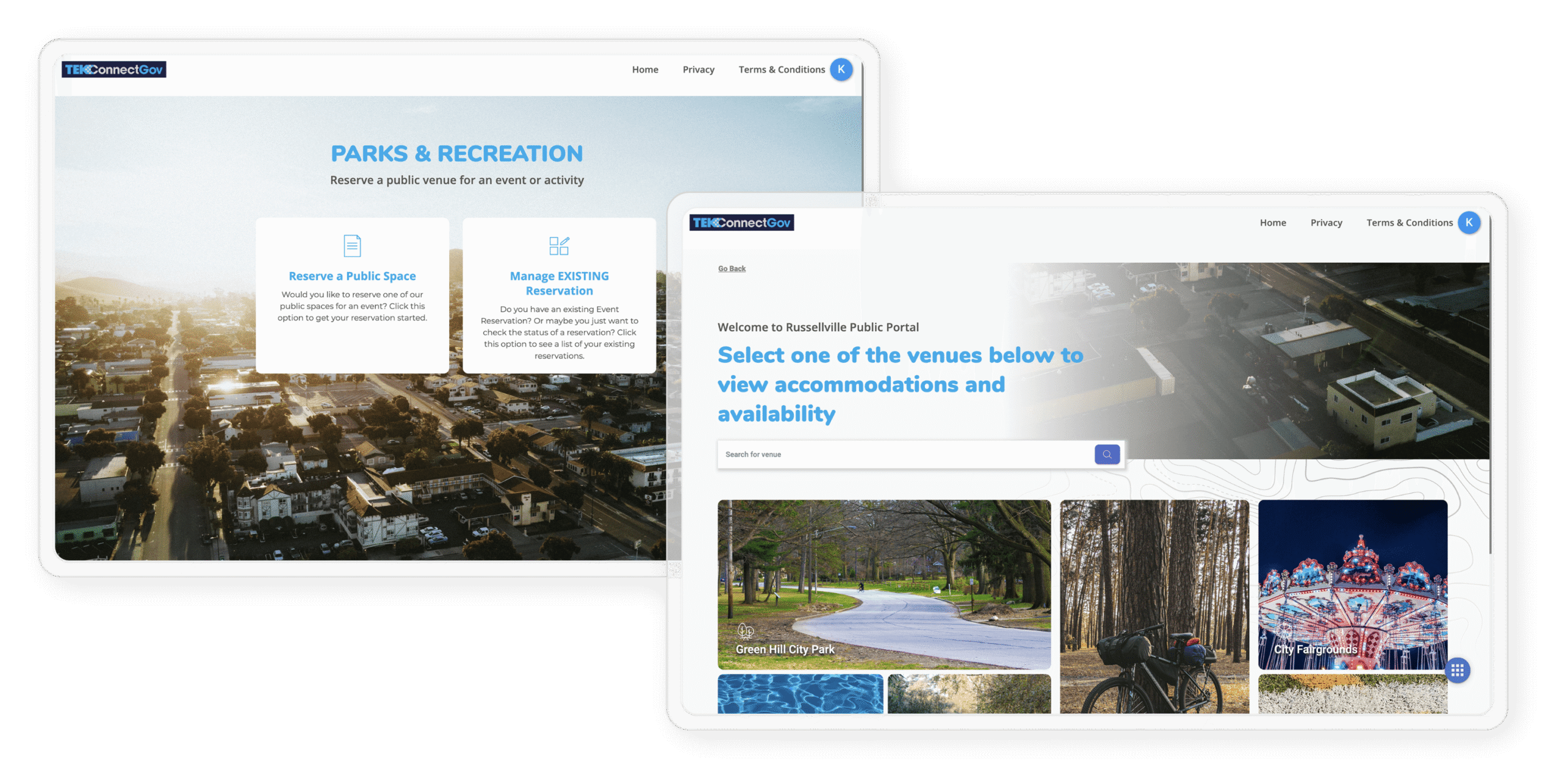
How Reservation Works
Reservation Requests, Approvals, Invoicing, and Payment all Handled Online
Residents browse, request, pay, and receive confirmation without visiting city hall. Staff review and approve without chasing down paperwork. The calendar updates automatically so double bookings never happen.
01
Resident Submits a Reservation Request
Residents browse available venues, check the calendar for open dates, and submit a reservation request through the public portal. They pick the venue, the date, the time, and fill in the event details all in one step.
02
City Staff Reviews and Approves
Staff review the request, confirm the venue is available, and approve it in the system. If any information is missing or questions need answering, staff can communicate with the requestor through the system before approving.
03
Invoice Generated and Sent
Once approved, the system generates an invoice based on the venue’s rental rate and applicable fees. The invoice is sent to the requestor automatically through the portal.
04
Payment Collected Online via Stripe
The requestor pays the invoice online through the portal using the system’s native Stripe integration. Payment confirmed instantly. Full payment record maintained for reconciliation.
05
Booking Locked on the Calendar
Once payment is confirmed, the reservation is finalized and the time slot is locked on the venue calendar. No one else can request that venue for that time and the requestor gets their confirmation automatically.
- Rental rates, approval rules, required reservation fields, and calendar settings are all configurable per venue and per city. Multiple venues can have different rules and pricing in the same system.
- Rental rates, approval rules, required reservation fields, and calendar settings are all configurable per venue and per city. Multiple venues can have different rules and pricing in the same system.
BEYOND RESERVATIONS
Events, Memberships, and Multiple Venues — Al all in One System

Prevents double bookings automatically
Once a reservation is approved and paid, the venue and time slot locks. Anyone requesting the same venue and date sees it as unavailable. The double bookings that come with manual calendars and spreadsheet scheduling don’t happen here.

Manages multiple venues and locations
Parks, pavilions, shelters, recreation center rooms, athletic fields, aquatic lanes. Every facility has its own calendar, pricing, and availability settings, all managed through one system. Staff get a single view across all of them.

Event registrations
The system handles event registrations for city-run programs, classes, and events alongside venue reservations. Manage capacity, collect registration fees online, and keep participant records in the same place. This is not a commercial ticketing platform. It is built specifically for municipal recreation programs.

Membership management
Offer and track memberships for aquatic centers, fitness facilities, and recreation programs. Members sign up and pay online. Staff see active memberships, expiration dates, and renewal status all in one place.

Online payment via Stripe
All reservation fees, registration costs, and membership payments collected through the portal using native Stripe integration. Every payment recorded automatically for reconciliation. No cash handling, no manual receipts.

Revenue and usage reporting
See which venues are most used, which time slots are most popular, and how much revenue each facility generates. Use that data to make better decisions about programming, pricing, and facility investment.
Common Questions
Parks and Recreation Services - FAQ
What does the Parks and Recreation module manage?
The Parks and Recreation module helps cities manage reservations, event registrations, memberships, and scheduling across multiple venues and locations. That includes pavilions, park shelters, recreation facilities, aquatic centers, meeting rooms, and any other public spaces your city makes available to residents and organizations. The system is built to eliminate double bookings, streamline the approval process, and give the public a straightforward way to reserve city spaces online.
Can the public submit a reservation request online?
Yes. Residents and organizations can browse available venues, check availability, and submit a reservation request through the public portal at any time without visiting city hall. From there, city staff reviews and approves the request, an invoice is generated and sent to the requestor, and payment is collected online. Once that is done, the event goes on the city’s reservation calendar.
How does the system prevent double bookings?
Once a reservation is approved, that time slot and venue are locked on the city’s calendar and no longer show as available for other requests. When a new request comes in for the same venue and date, the system shows it as taken. That takes the place of manual calendar management and the back-and-forth phone calls that tend to cause double bookings in paper or spreadsheet-based systems.
Can we manage multiple parks, pavilions, and venues in one system?
Yes. The system is built to handle multiple venues and locations at the same time, each with its own availability calendar, pricing, and approval rules. A city can manage park pavilions, recreation center rooms, athletic fields, and aquatic center lanes all in one place, with staff having a single view of all reservations across all facilities.
Is this system only for pavilion rentals, or can it handle event registrations too?
It handles both. Beyond venue reservations, the system supports event registrations so residents can sign up for city-run programs, classes, or events. It is not a full ticketing platform, but it covers the registration, payment, and roster management that most municipal recreation programs actually need. Cities can manage event capacity, collect registration fees online, and keep participant records in one place.
Can the system handle memberships, for example for a recreation center?
Yes. The Parks and Recreation module supports membership management, allowing cities to offer and track memberships for recreation facilities. Members can sign up and pay online, and staff have a clear view of active memberships, expiration dates, and renewal status. This is particularly useful for aquatic centers, fitness facilities, and recreation programs that operate on a membership model.
How does the invoicing and payment process work for a reservation?
Once staff approves a reservation request, the system generates an invoice based on the venue’s rental rate and any applicable fees. That invoice goes out to the requestor through the portal, and they can pay online through the system’s integrated Stripe payment processing. Once payment is confirmed, the reservation is finalized on the calendar and the requestor gets a confirmation. The full payment record stays in the system for reconciliation.
"It was much easier than I could ever have imagined to reserve a space for a birthday party."
Mary Peters
Eliminate Double Bookings. Modernize Your Reservations.
Schedule a free demo and see how TEKConnectGov manages your venues, events, and memberships in one place.