
Code Enforcement
Automate Code Enforcement from Violation to Resolution
Ordinance-driven inspection scheduling, automated notifications with full audit trail, re-inspection invoicing, officer assignment, and complete mobile field access, all in one configurable system.
- Configurable to your city: Violation types, correction periods, re-inspection fees, notification triggers, and officer assignment rules all adapt to your specific ordinances. No custom development needed.
Why It Matters
Complete Case Tracking Start to Finish. Nothing Falls Through the Cracks.
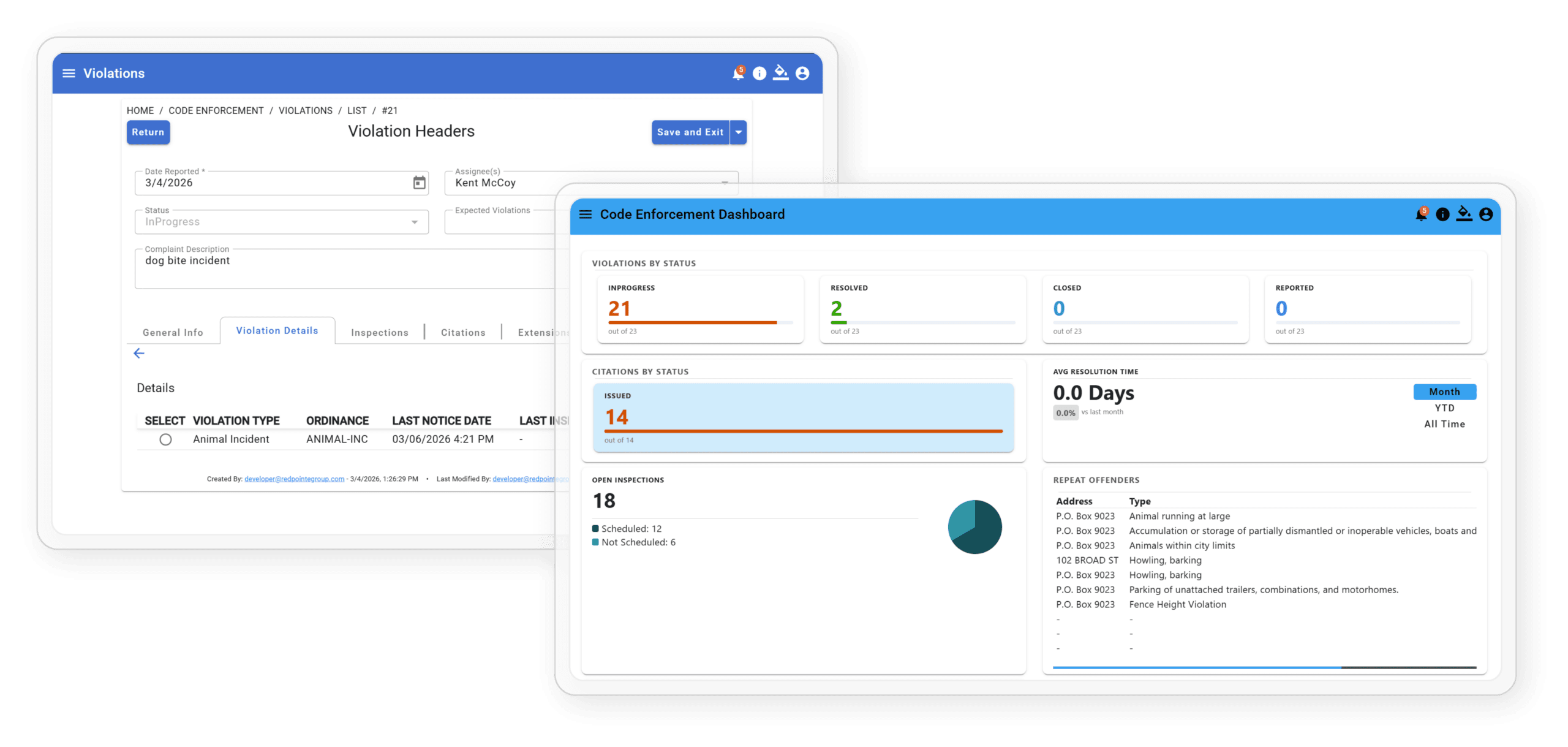
Code enforcement works when cases are documented thoroughly, followed up consistently, and visible to everyone who needs to see them. TEKConnectGov gives officers and administrators a single system that tracks every reported violation from initial complaint through inspection, re-inspection, and citation. Automated scheduling and notifications handle the follow-up so nothing gets lost in a spreadsheet or missed in the shuffle.
How it works
From Complaint to Compliance, Automatically
The default workflow below works for most cities on day one. Every step is
configurable to your specific ordinances.
01
Violated Logged
Staff or officer creates a violation record by address, including photos, violation type, and ordinance section. The system creates the case and timestamps the date automatically.
02
Ordinance-Driven Scheduling
Based on the “days to correct” defined in your ordinances, the system automatically calculates and schedules the follow-up inspection. No manual calendar work required.
03
Officer Assigned
Case is assigned to the appropriate code enforcement officer. Officers see their full case queue from any device in the field, whether that’s a phone, tablet, or desktop.
04
Violation Notice Sent & Logged
Formal notice is sent to the property owner by email or SMS. The system logs the exact date and time, creating an automatic, timestamped audit trail for every notification.
05
Re-inspection / Extend / Reschedule
Re-inspections are conducted in the field on any device. Extensions and reschedules are handled in the system, with every change logged by reason and date.
06
Re-inspection Invoice Created
If your fee schedule includes re-inspection fees, the system automatically generates and sends the invoice, tied to the case record so nothing falls through the cracks.
07
Create Additional Inspections
Officers can initiate inspections proactively, without a prior complaint, for enforcement campaigns or follow-up on flagged properties.
08
Close or Escalate
Compliant? Case closed with full documented history. Non-compliant? Escalate with citation and a complete legal record ready for any proceedings.
- Configurable to your city: Violation types, correction periods, re-inspection fees, notification triggers, and officer assignment rules all adapt to your specific ordinances. No custom development needed.
Key Features
Everything Your Officers Need

Confirmed Reported Violations
Document violations with photos, assign inspectors, send notices, and schedule follow-up inspections, all from one case record.

Track Citations
Attach citations to violation records. Every code enforcement case builds a complete history, ready for legal proceedings at any time.

GIS Violation Mapping
View all active violations on a map by address. Overlay your city’s own GIS layers and parcel data for instant field context.
Built for the Field — Any Device
TEKConnectGov is a Progressive Web App that runs in any mobile browser with no download required. Officers use the full system from whatever phone or tablet they carry.

Automated Re-Inspection Invoicing
When re-inspections are triggered, the system creates and sends the fee invoice automatically. Every re-inspection fee captured. Nothing missed.

Email Notifications
Automated notifications keep every party informed at every stage, from violation issued and inspection scheduled to extension granted and citation issued, with each one timestamped and logged.
Common Questions
Code Enforcement — FAQ
What is code enforcement software?
Code enforcement software helps municipalities manage code violations from start to finish. Instead of relying on paper forms and manual follow-up, your team gets a central system to document complaints, schedule inspections, issue citations, and track resolution all in one place.
How does TEKConnectGov's code enforcement software work?
When a violation is reported, the system documents it, assigns a city inspector, and schedules a follow-up inspection automatically. Citations attach directly to the case so you always have a complete record.
Is TEKConnectGov built for small and mid-sized municipalities?
Yes. TEKConnectGov is built for local governments that need a straightforward solution without a lot of complexity. Whether you manage a small city or a growing municipality, the software is designed to fit your team and your budget.
What types of code violations can the software manage?
TEKConnectGov supports a wide range of violations including zoning issues, property maintenance complaints, nuisance reports, and safety hazards. Inspectors can document violations, attach photos, and update cases from their phone or tablet while in the field.
Can inspectors use the software in the field?
Yes. Inspectors can submit reports, attach photos, and update case status directly from a mobile device on site. No need to return to the office to enter paperwork.
How is TEKConnectGov different from other code enforcement software?
TEKConnectGov brings violation tracking, citation management, GIS mapping, and automated notifications together in one platform built for local governments. It is easy to learn, backed by solid customer support, and designed to help your team get more done without adding complexity.
See Code Enforcement in Action
Are you ready for software that your team will actually want to use? Schedule a free demonstration wSchedule a free live demo and watch the full workflow from violation to resolution in real time.ith the TEKConnectGov team today to experience the difference for yourself.