
Building Permit Software
The Complete Permit Lifecycle. Online, Start to Finish.
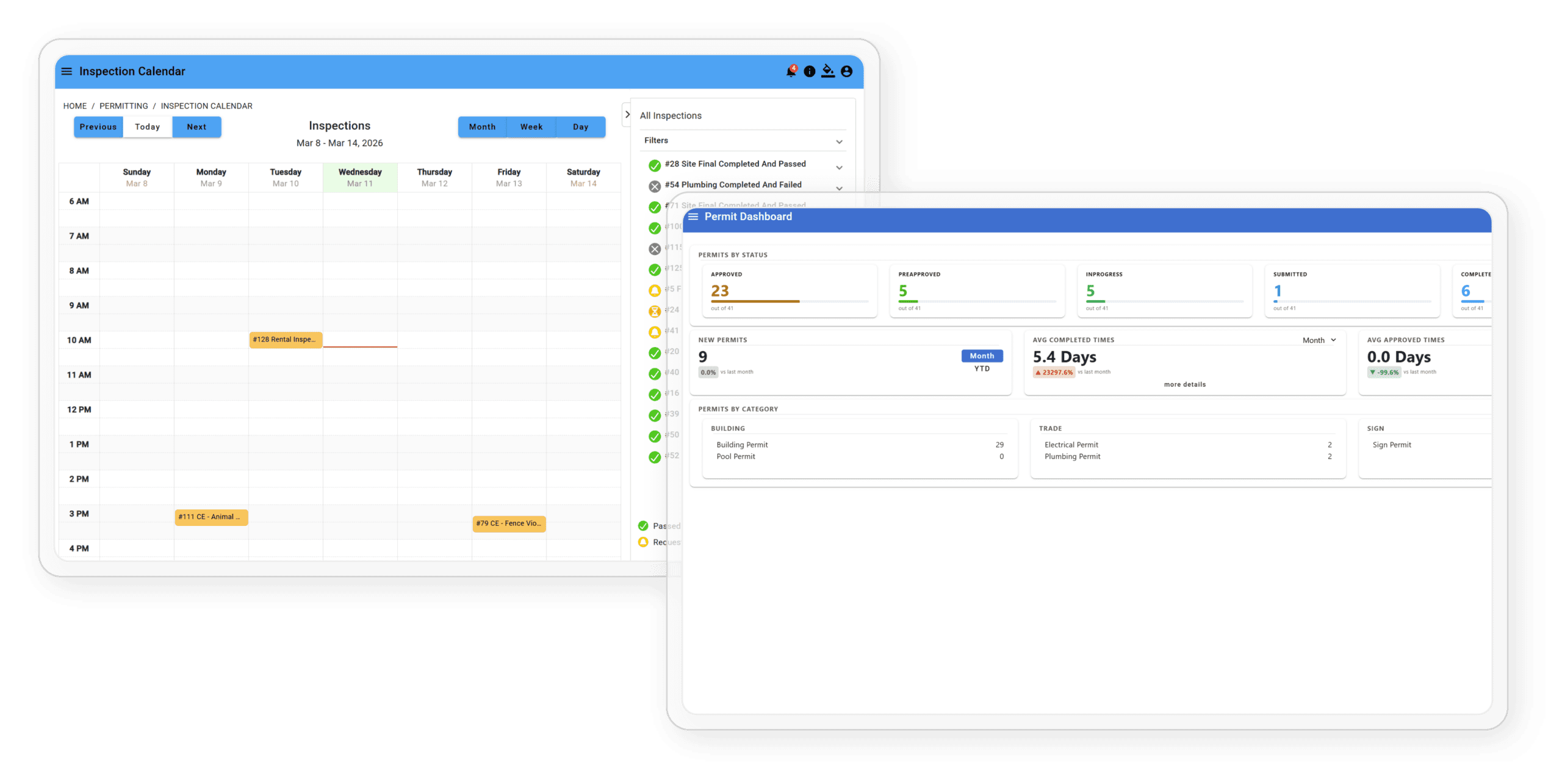
From application to Certificate of Occupancy, TEKConnectGov handles online payment, pre-approval review, inspector field tools, and instant COO issuance. No office visits. No paper. Full visibility at every step.
- Configurable to your city: Violation types, correction periods, re-inspection fees, notification triggers, and officer assignment rules all adapt to your specific ordinances. No custom development needed.
- Configurable to your city: Violation types, correction periods, re-inspection fees, notification triggers, and officer assignment rules all adapt to your specific ordinances. No custom development needed.
How A Permit Works
From Application to Certificate of Occupancy
Every step happens online. No office visits for applicants.
No manual tracking for staff.
01
Violated Logged
Staff or officer creates a violation record by address, including photos, violation type, and ordinance section. The system creates the case and timestamps the date automatically.
02
Ordinance-Driven Scheduling
Based on the “days to correct” defined in your ordinances, the system automatically calculates and schedules the follow-up inspection. No manual calendar work required.
03
Officer Assigned
Case is assigned to the appropriate code enforcement officer. Officers see their full case queue from any device in the field, whether that’s a phone, tablet, or desktop.
04
Violation Notice Sent & Logged
Formal notice is sent to the property owner by email or SMS. The system logs the exact date and time, creating an automatic, timestamped audit trail for every notification.
05
Re-inspection / Extend / Reschedule
Re-inspections are conducted in the field on any device. Extensions and reschedules are handled in the system, with every change logged by reason and date.
06
Re-inspection Invoice Created
If your fee schedule includes re-inspection fees, the system automatically generates and sends the invoice, tied to the case record so nothing falls through the cracks.
07
Create Additional Inspections
Officers can initiate inspections proactively, without a prior complaint, for enforcement campaigns or follow-up on flagged properties.
08
Close or Escalate
Compliant? Case closed with full documented history. Non-compliant? Escalate with citation and a complete legal record ready for any proceedings.
- Configurable to your city: Violation types, correction periods, re-inspection fees, notification triggers, and officer assignment rules all adapt to your specific ordinances. No custom development needed.
“The permitting and inspections module has saved our team so much time throughout the year, freeing us up to tackle other important municipal initiatives.”
Deb from Finance
Key Features
Everything for Permitting & Inspections

Instant COO Issuance
Certificate of Occupancy is generated the moment the final inspection passes and available for download immediately. No waiting, no office visit.

Native Stripe Payments
Stripe is fully integrated, not bolted on. Permit fees, refunds, reconciliation, and payout management are all handled inside the system.

Inspection Ready in the Field
Inspectors use any device with no download required. Take photos, add notes, pass or fail, and request re-inspections all from the field.

Customized to Your Workflow
From initial form submission to issuing a COO, TEKConnectGov tailors the experience to your city’s specific processes and fee schedules.

Automated Fee Calculation
Fees calculated automatically based on your city’s fee schedule. Invoices generated and sent without manual calculation.

Re-Inspection Invoicing
If your schedule includes re-inspection fees, the system auto-creates the invoice when triggered. Every fee captured, nothing missed.
Common Questions
Permitting — FAQ
What is permitting and inspection software?
It’s a web-based platform that manages the full permit lifecycle online, from the initial application through inspections and certificate of occupancy issuance. City staff and residents both have access, so everyone can track the process from start to finish without extra phone calls or paperwork.
Is this affordable for smaller cities?
TEKConnectGov is built around modular pricing, so your city only pays for what it needs. You’re not buying a bloated package to get access to permitting and inspection tools. Cities of any size can get started without overextending their budget.
Can residents and contractors apply for permits online?
Yes. Applicants can submit forms, upload documents, pay fees, and track their permit status through the online portal. No special software is required on their end, just an internet connection. This reduces phone calls to city staff and creates a better experience for everyone involved.
How does the system handle permit fees?
Fees are calculated automatically based on your city’s fee schedule. The platform generates invoices and collects payments online, so your staff does not have to process fees manually.
Can inspectors use this software in the field?
Yes. Inspectors can perform inspections, take photos, add notes, and log results from a phone, tablet, or laptop. There’s no need to return to the office to update records after each visit.
How much does TEKConnectGov customize the software for our city?
TEKConnectGov configures the platform around your city’s existing process. Your forms, approval workflows, and fee schedules are all set up before you go live, so the system works the way your team already works.
How does certificate of occupancy issuance work?
Once all inspections are complete and permit requirements are met, a certificate of occupancy can be issued immediately through the platform. Both the applicant and city officials receive a digital copy they can print or store for their records.
What reporting tools are included?
The platform includes built-in reporting that lets you export permit data to Excel or CSV. TEKConnectGov can also build custom reports based on your city’s specific needs.
What if something goes wrong with the software?
You reach a real person on our team. TEKConnectGov handles support directly so you’re not navigating automated systems or getting passed around to find an answer.
Does the platform send notifications to applicants?
Yes. The system sends automatic SMS and email notifications so applicants stay informed on their permit status without having to follow up with your office.
See the Full Permit Lifecycle in Action
Watch a permit go from application to COO in a free live demo.